Third
Eye
A local AI that can see your screen and use your Mac. A summonable overlay pairs a language model running on your machine with real eyes and hands — and checks every action against what the OS actually did.
I built it because a model that can only talk is a model that has to guess. This one looks, acts, and reports back. It is early, used daily, and open source.
ask, watch, verify
A hotkey opens a glass panel at the edge of the screen. Say what you want in plain language: find something on a site, run a command, fix the paragraph you highlighted.
A small HUD names every step as it happens — focus Chrome, read the screen, click, type. The pointer moves visibly. Esc stops it.
Each action reports back what the OS observed: where the cursor really is, which app has focus, whether the text landed. A miss is a typed failure the model has to deal with, not narrate past.
what it does
Talks to a model served on your machine (LM Studio, any OpenAI-compatible endpoint). Cloud providers exist behind an explicit opt-in and a fail-closed guard. Screen frames are never stored.
The focused window through the accessibility tree first, on-device OCR second, with real click targets. Window-scoped by default, so a read takes a few hundred milliseconds.
Clicks, typing, drags and shortcuts, plus pressing controls by name through accessibility, driving Chrome's tabs and page DOM, and reading or rewriting the text you selected in any app.
Three run modes (off, ask, auto-run), per-kind grants, a command allowlist — and a set of dangerous verbs (sudo, rm, kill, git push, uploads, pipe-to-shell) that always ask, no matter what.
One toggle strips the invisible shortcuts. It does the task with visible keyboard and mouse only, narrates as it goes, and ends with a numbered recap so you can do it yourself next time.
A coder lane with workspace tools, diffs in the loop, a VS Code extension that shows edits as they happen, and a thirdeye command line and TUI.
A local SQLite memory with categories, tags, pins and expiry. Facts you asked it to keep ride along automatically. Transcripts are redacted before they are saved.
Deterministic evals pin the safety gates; a live harness scores the real model on canonical asks; every run leaves a copyable report for bug reports.
how it is built
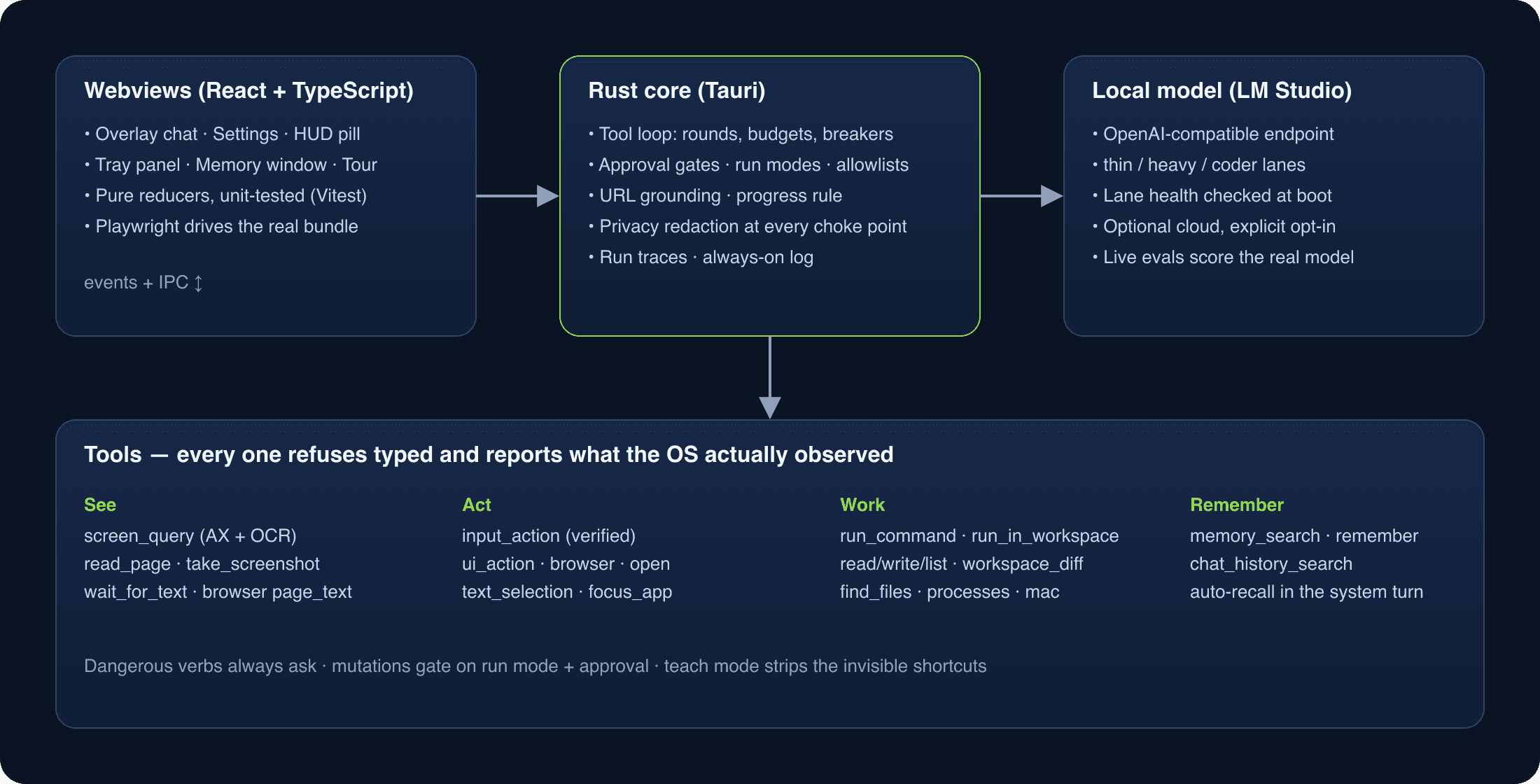
A Tauri v2 app: one Rust process owns every OS capability, model call and byte of stored data; small React webviews render what they are handed. The design rule is structure over prose — a small local model treats instructions as advisory, so every guarantee lives in code: typed refusals, grounding gates, budgets, breakers, redaction at the choke points.
Get it
macOS 14 or later and a tool-capable model served by LM Studio. Download a release, or clone the repository and build it with one make target. Contributions are welcome — the README explains the test battery every change runs.